University admission service
— we check eligibility first
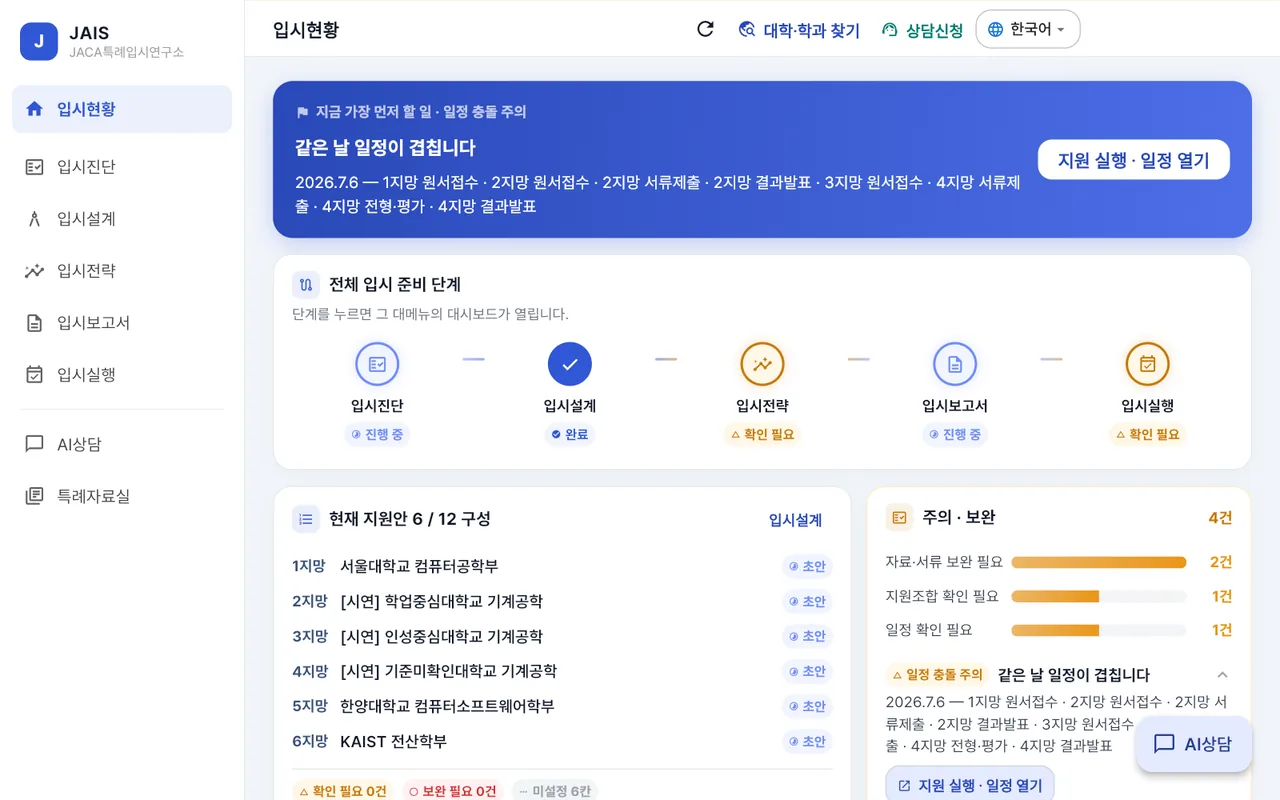
JAIS is JAIS (JACA AI), used directly by students and guardians. It is where you check your preparation status, enter materials, get AI consultation, and organize everything into an admissions report through to applying. Consultation splits by application year — Grade 12 finalizes the application track from the record already built (AC), and Grade 11 and below build eligibility (GC). Analysis results are reference judgments, and you finalize the application plan yourself.
Login is required. When you press Open, the login and sign-up screen appears. With the same account you see the same data on the web and on mobile.
20 years of educational experience plus AI
Deep experience, precise analysis, systematic management. Neither experience alone nor AI alone is enough. We analyze 20-plus years of experience precisely with AI and complete it with expert judgment — diagnosis → analysis → prescription → management.
20-plus years of experience on the ground
We put into consulting the experience built by directly teaching and counseling students at overseas academies and schools. We view problems of educational environment, curriculum, grades, language and career from the viewpoint of the field.
AI-based JAIS analysis · management
We systematically analyze and manage a student's academic, activity, career and admissions information. We do not rely only on an individual consultant's instinct; we look consistently with accumulated data.
PREMIUM · Expert consulting
We add field-specific expert consulting to JAIS analysis and management by a dedicated consultant. The analytical power of AI + the experience of the consultant + the expertise of the specialist.
Different application years, different consultations
AC Admissions consulting · Grade 12
We finalize the application track and manage the application season together.
- Finalizing eligible admission tracks and narrowing university and major candidates
- Submission document list and a schedule counted back from deadlines
- Review rounds for the self-introduction essay and interview preparation
- Final university application plan reflecting the final grades
GC Education consulting · Grade 11 and below
This is the stage of building eligibility. We look first at subject choice and activity design.
- Organizing enrollment history and residence records (makes proof easier later)
- Subject-choice design by curriculum
- Activity and award plan aligned with your target field
- Preparation roadmap by grade
Admissions proceeds in five steps
Admission Diagnosis → Admission Design → Admission Strategy → Admission Report → Admission Execution. The app's menus are laid out in this order, and Admission Status at the top shows which step you are on now.
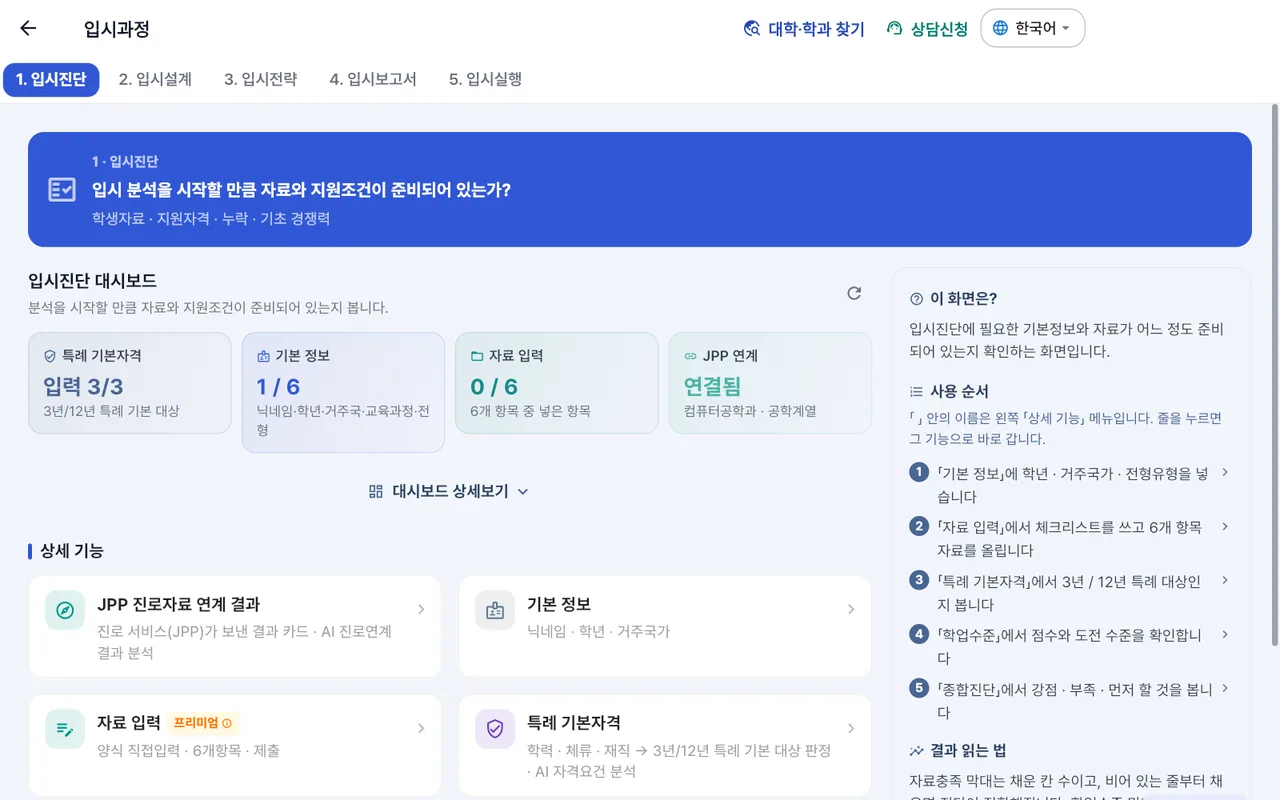
1 · Admission Diagnosis
We check whether your data and eligibility are in place enough to start analysis. Student data · eligibility · missing data · basic competitiveness.
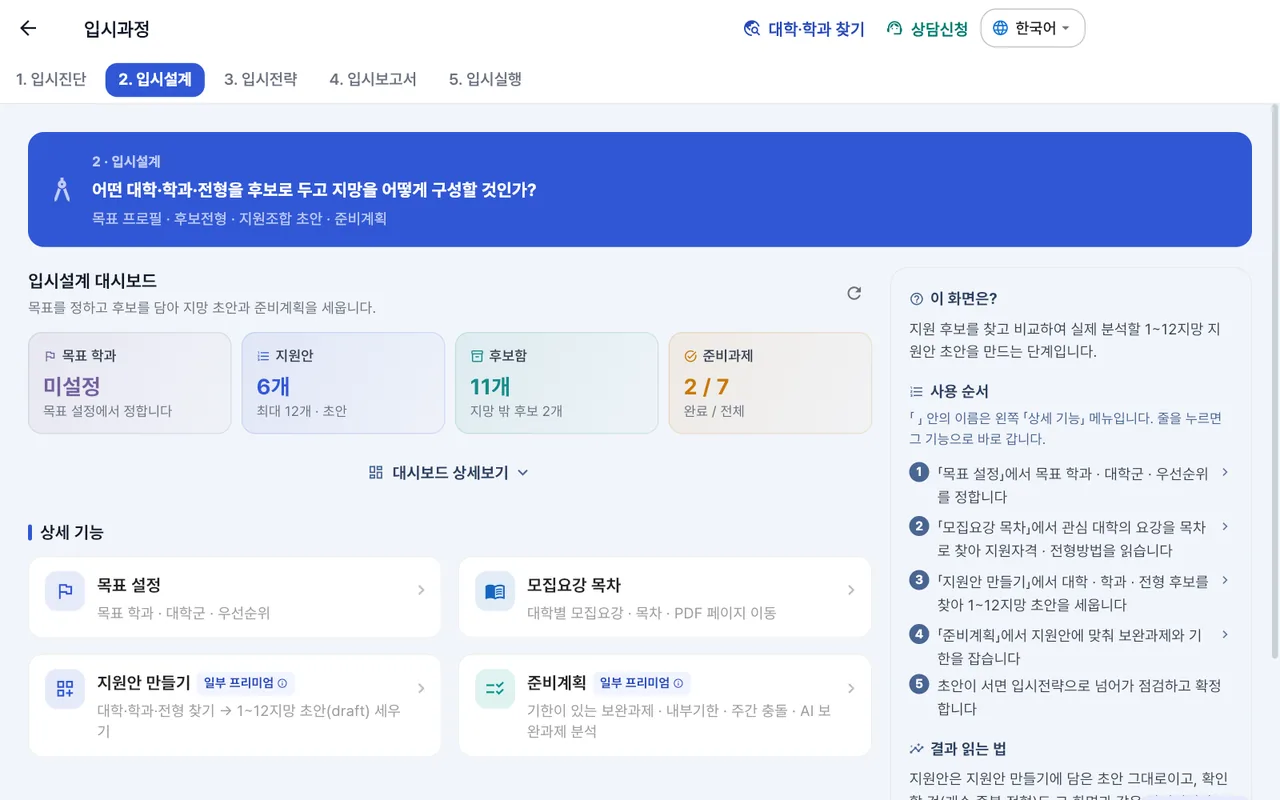
2 · Admission Design
Decide which universities, majors and admission tracks to keep as candidates and how to build your choices. Target profile · candidate tracks · application-combination draft · preparation plan.
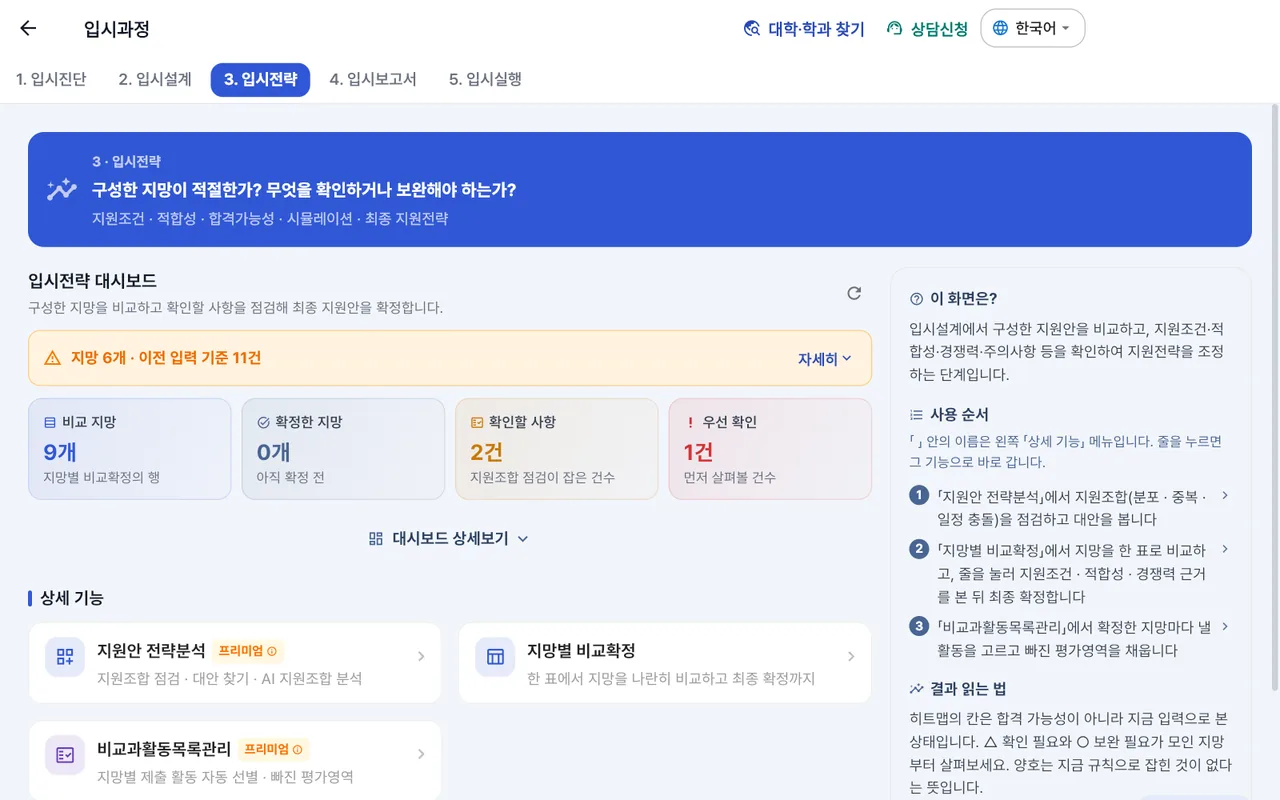
3 · Admission Strategy
See whether the choices you built are appropriate and what needs checking or supplementing. Eligibility · fit · simulation · final application strategy.
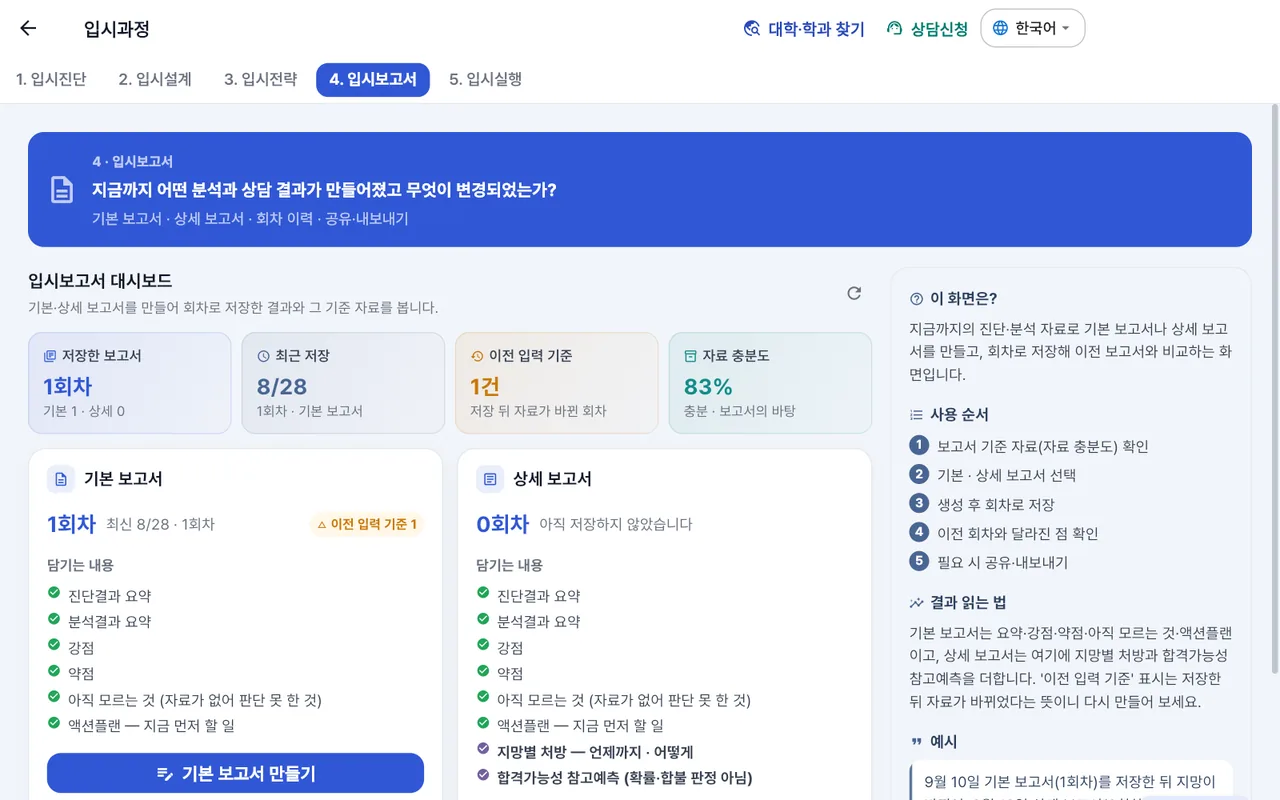
4 · Admission Report
See the analysis and consultation results so far and what has changed in one document. Basic and detailed reports · round history · sharing and export.
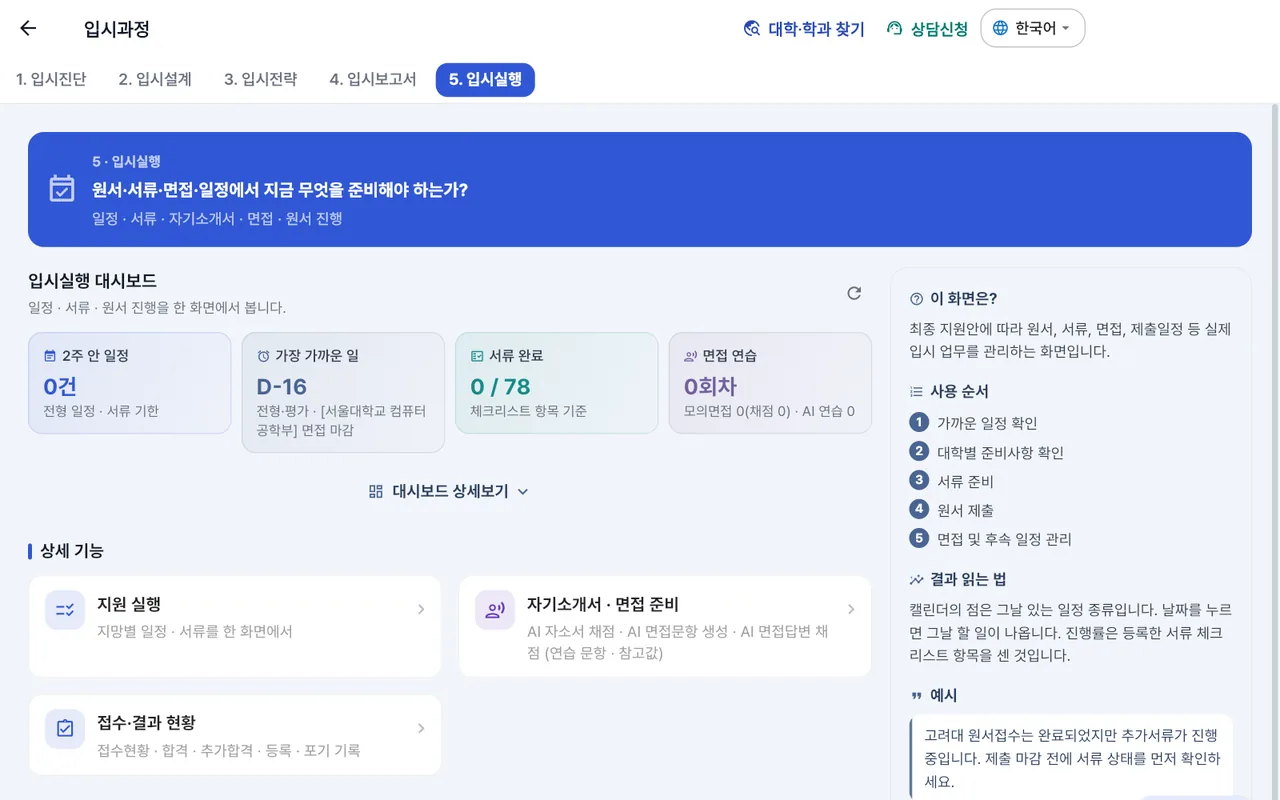
5 · Admission Execution
Keep track of what to prepare now across applications, documents, interviews and schedules. Schedule · documents · self-introduction essay · interview · application progress.
+ Shared places
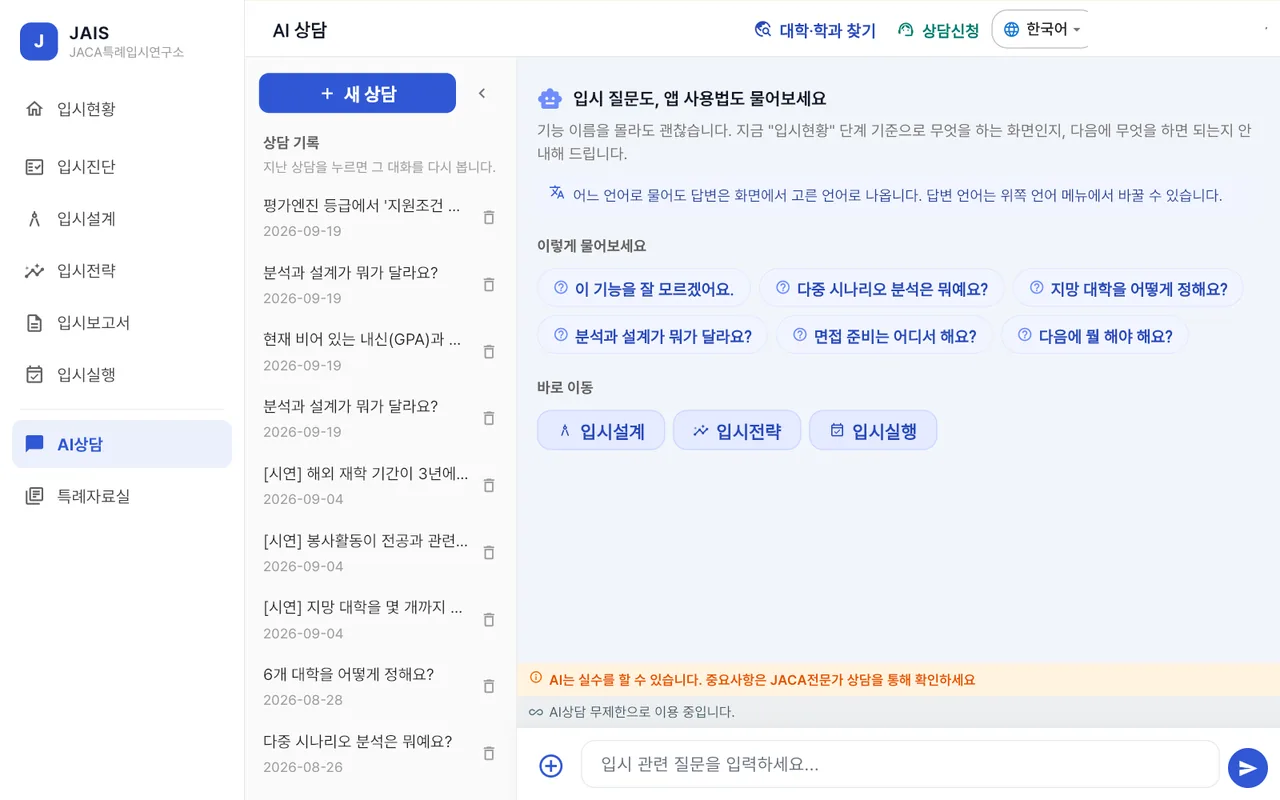
Admission Status — which step you are on and what comes next. AI Consultation — ask questions and upload materials for analysis (Premium includes 1:1 consultation with an admissions expert). Special-Admission Library (특례자료실) — admission guidelines, track information and document templates verified by the operators. After an admissions-consulting phone consultation, expert feedback and consultation records arrive in the app.
Data carried over from career
Students who used the JPP Career Exploration Service arrive with their target major and a preparation summary. Original materials do not come across, and what was passed on is recorded on screen.
The same account on web and mobile
Whether you open it in a browser or on your phone, you see the same data with the same account and the same student_id. You only need to log in once in the app.
The side that reviews what students send
The following is not a customer-facing screen. It is the console where assigned experts and operators review student data, approve definitive wording and run the service. It opens only when you log in with that role.
Admissions workspace Expert
Strategy overview by student · data readiness · eligibility/document center · admission-track analysis · university and major strategy board · action plan · self-introduction/interview review rounds · final application plan (locked by a person) · report publication.
Admin console Super administrator
Members · subscriptions · workspace assignment · content (materials that go into the Special-Admission Library) · statistics · system settings.
Eligibility and level diagnosis take just 3 minutes
The eligibility diagnosis shows which admission groups you can apply to, and the level diagnosis shows which university group your current academic preparation could target. Results appear right on screen, and your contact number is asked for only when you save the result.
1) Eligibility diagnosis — admission groups you can apply to
We check three areas. These three are where the requirements of 특례 admission tracks actually split.
1. Education
Years of overseas enrollment and completed grades, graduation and recognition of academic history. The unit for counting years of enrollment differs by university, so we also look at the school records that serve as evidence.
2. Residence
The period of accompanying residence of the student and guardian and entry and exit history. For residence requirements, not just the period but whether you accompanied is judged together.
3. Employment
Proof of the guardian's overseas employment and assignment. The scope of recognition differs by the form and period of dispatch.
- Reviewable — admission groups where your answers match the requirement direction and review can proceed
- Needs further confirmation — interpretation of university-specific rules or additional data must be checked
- Hard to judge with current information — when key answers are empty
The basis of judgment is each university's admission guidelines. We organize major universities' guidelines item by item and compare them with your answers, and show the reference date when the guidelines are revised.
2) Level diagnosis — your current academic preparation level
We divide nine areas into 100 points. If you enter your data it is read automatically, and students and consultants can overwrite it.
| Item | Points | What we look at |
|---|---|---|
| Overall school grades | 20 points | School transcript (GPA 4.0 · IB 45 · grade · 100-point scale) |
| Core subjects related to the major/field | 20 points | Advanced subjects linked to the major, such as AP · IB HL |
| Standardized academic scores | 10 points | IB total · AP scores by subject · A-Level grades |
| SAT | 5 points | Your score or expected score range |
| English proficiency | 8 points | TOEFL score (old TOEFL and the new TOEFL band are also converted to iBT) |
| Excellence | 5 points | Scholarship certificates · awards · commendations — counted by weight, not by number (national/international > regional/in-school top > participation/completion) |
| Inquiry · projects related to the major/field | 15 points | Records of inquiry · projects · papers · experiments |
| Activities related to the major/field | 10 points | Clubs · contests · internships that connect to your major |
| Leadership / volunteering, etc. | 7 points | Roles held such as student council · officer · volunteer planning · long-term volunteering |
| Total | 100 points | Empty items are 0 points, and we also show what is empty |
Reading the result — five ranges
| Range | Standard |
|---|---|
| SKY challenge level | 90 points or above (Grade S) |
| Seo-Sung-Han (서성한) challenge level | 80 points or above (Grade A) |
| Jung-Kyung-Oe-Si-Lee (중경외시이) challenge level | 70 points or above (Grade B) |
| Kon-Dong-Hong-Soong-Kook (건동홍숭국) challenge level | 60 points or above (Grade C) |
| Group A- or below challenge level | 50 points or above (Grade D) |
| Under-prepared level | Below 50 points |
- Weights by grade — Grade 12: 1.0 · Grade 11: 1.1 · Grade 10: 1.2. More remaining semesters means more time to fill things in, so the same data scores higher for lower grades (it still does not exceed 100 points after weighting).
- Empty items are 0 points — not neutral, but "not entered yet". For each item we also show how many points you gain by filling it.
"Challenge level" is a range showing which university group your current preparation could target, and is not admission likelihood or a prediction. The university groups are a conventional bundling for comparing application difficulty; actual selection is decided by each university's admission guidelines.
Sort admission groups with the eligibility diagnosis
It takes 3 minutes. The result is a preliminary judgment and does not finalize eligibility.